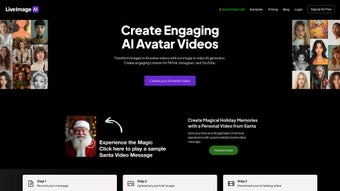

Télécharger LiveImage AI Avatar – Créateur d'avatars parlants IA gratuit, générateur de vidéos
Intro & Overview
LiveImage AI Avatar est une application web basée sur le cloud qui transforme n'importe quel portrait statique en une vidéo IA réaliste et parlante. Conçu pour les créateurs, les éducateurs, les marketeurs et les petites entreprises, l'outil élimine le besoin de rigs de capture de mouvement coûteux ou de studios d'animation professionnels. En téléchargeant une image claire et en enregistrant un court message vocal ou en tapant du texte pour le moteur texte‑à‑parole intégré, les utilisateurs reçoivent une vidéo où l'avatar imite des expressions faciales naturelles, synchronise parfaitement les lèvres et reproduit le ton du locuteur.
Le flux de travail est délibérément simple : aucune installation de logiciel, aucune courbe d’apprentissage abrupte et aucun frais caché pour la version de base. Parce que la plateforme fonctionne entièrement dans le navigateur, elle fonctionne sous Windows, macOS, Android et iOS, vous donnant la liberté de produire du contenu depuis un poste de travail de bureau ou une tablette mobile. Les vidéos générées peuvent être exportées au format MP4 ou GIF, prêtes à être partagées immédiatement sur les réseaux sociaux, intégrées dans des présentations ou téléchargées sur des systèmes de gestion de l’apprentissage.
Bien que la vitesse de rendu dépende de la résolution de l'image et de la charge du serveur, la plupart des vidéos sont produites en 30 secondes à une minute, maintenant la boucle de création suffisamment rapide pour des campagnes en temps réel. Le point de vente unique de LiveImage AI Avatar est sa bibliothèque d'avatars illimitée – vous n'êtes pas limité à un ensemble restreint de personnages pré‑conçus, ce qui signifie que chaque sortie peut être vraiment personnelle et spécifique à la marque. Que vous créiez un hook TikTok, une vidéo explicative d’entreprise ou une leçon interactive en classe, cette solution gratuite à l’essai offre un moyen sécurisé et évolutif d’ajouter une touche humaine au contenu numérique sans les tracas de production habituels.
Core Features That Differentiate LiveImage AI Avatar
- Unlimited Avatar Creation: Upload any high‑resolution portrait – personal photos, stock images or custom illustrations – and instantly generate a talking avatar.
- Natural Facial Animation: Deep‑learning models produce realistic eyebrow raises, eye blinks and mouth shapes that sync precisely with the recorded voice.
- Voice Mimicry & Multilingual TTS: Use your own voice recording for authenticity, or let the AI generate speech in English, Spanish, French, German or Mandarin.
- One‑Click Export Options: Download the final clip as 1080p MP4 or lightweight GIF, both optimized for quick upload to YouTube, Instagram Reels, LinkedIn or LMS platforms.
- Secure Cloud Processing: All uploads are encrypted in transit (TLS 1.3) and stored only temporarily; files are automatically purged after 24 hours, complying with GDPR and CCPA standards.
- Cross‑Platform Web Interface: No installation required; the responsive UI works on Chrome, Edge, Safari and Firefox across Windows, macOS, Android and iOS.
- Batch Generation (Pro Feature): Create multiple avatars simultaneously, ideal for campaigns that need dozens of personalized videos.
- Future‑Ready API Access: Developers will soon be able to embed avatar generation into their own applications via a RESTful API.
Together, these capabilities make LiveImage AI Avatar a powerful yet approachable tool. The unlimited avatar option removes creative constraints, letting you align each video with a specific brand identity or personal story. Realistic facial movements and accurate lip‑sync boost viewer engagement, while multilingual TTS expands reach into non‑English markets without hiring voice actors. Security‑first processing protects sensitive client images, a crucial factor for agencies handling confidential material. Finally, the browser‑based design sidesteps compatibility headaches, ensuring that whether you are on a Windows laptop in the office or an iPad on the train, you can generate high‑quality talking avatars with just a few clicks.
Installation & Usage – From First Click to Final Video
Step‑by‑Step Setup
- Visit the official site: Open liveimage.ai/avatar and click the prominent “Start Now” button.
- Create a free account: Register using an email address or sign in with Google/Apple. A verification email unlocks the free tier, which allows up to five videos per day.
- Upload your portrait: Drag‑and‑drop a JPEG, PNG or WEBP file (minimum 500 × 500 px recommended). The AI scans the image for facial landmarks and prepares a 3‑D mesh.
- Add audio: Choose “Record Voice” to capture a personal message, or select “Text‑to‑Speech” and type your script. The platform supports five major languages and offers a selection of natural‑sounding voice profiles.
- Fine‑tune settings (optional): Adjust expression intensity, video length (up to 60 seconds on the free plan), background color or enable a transparent PNG overlay for later compositing.
- Generate the avatar video: Click “Create Avatar Video.” The cloud‑based GPU server renders the clip, displaying a progress bar that usually completes within 30–45 seconds.
- Download or share: Once processing finishes, click “Download MP4” or “Download GIF.” You can also copy a shareable CDN link for instant embedding on websites or learning platforms.
Because all processing occurs on secure servers, there is no heavy client‑side load, and the interface remains responsive even on older devices. The dashboard includes a “History” tab where past projects can be re‑downloaded, edited or duplicated. If the output appears blurry, the system suggests uploading a higher‑resolution image or improving lighting to enhance landmark detection. Live support is available via live chat, and a detailed knowledge base addresses common issues such as audio lag, unsupported file formats, or occasional rendering delays during peak traffic. Power users can upgrade to the Pro plan for unlimited video length, priority rendering queues, batch generation and API access, all for a modest monthly fee.
Conclusion – Pros, Cons, Compatibility, FAQ & Call to Action
Supported Operating Systems
- Windows 10/11 – any modern browser (Chrome, Edge, Firefox)
- macOS 12 Monterey and later – Safari, Chrome, Firefox
- Android 9+ – Chrome Mobile, Firefox Mobile
- iOS 14+ – Safari, Chrome
Pros
- Unlimited avatar creation – any portrait works.
- Real‑time facial animation with accurate lip‑sync.
- Free tier available; no software download required.
- Secure cloud processing with automatic data deletion.
- Cross‑platform web interface works on all major OS.
- Multilingual TTS expands global reach.
Cons
- Free version limits video length to 60 seconds and 5 videos per day.
- Rendering speed can vary with server load and image quality.
- Batch generation and API access are locked behind the paid Pro plan.
Frequently Asked Questions
Can I use LiveImage AI Avatar for commercial projects?
Yes. The paid Pro plan includes a commercial license that permits unlimited use in marketing, advertising, and product demos. The free tier is limited to personal and non‑commercial use.
What image formats are supported?
JPEG, PNG and WEBP files are accepted. For optimal results, upload a high‑resolution portrait with a clear view of the face.
Is my data safe when I upload images?
All uploads are encrypted in transit (TLS 1.3) and stored temporarily on secure servers. Files are automatically deleted 24 hours after processing, meeting GDPR and CCPA requirements.
Can I edit the generated video after download?
Yes. The exported MP4 is fully editable in standard video editors such as Premiere Pro, Final Cut Pro or DaVinci Resolve, allowing you to trim, add subtitles or overlay additional graphics.
How does the pricing model work?
LiveImage AI Avatar offers a free tier with daily limits. The Pro subscription costs $19.99 USD per month and unlocks unlimited video length, batch generation, priority rendering and API access.
If you need a fast, secure and cost‑effective way to add a personal touch to your digital assets, LiveImage AI Avatar checks all the boxes. Its unlimited avatar library, realistic facial animation and multilingual speech synthesis provide a creative edge that many competitors lack. While the free tier’s daily caps may feel restrictive for high‑volume users, the affordable Pro plan scales smoothly for businesses and agencies. Rendering speed is generally quick, and the cloud‑first architecture ensures you can work from any device without worrying about compatibility. Whether you’re an educator creating engaging lessons, a marketer producing eye‑catching ads, or a hobbyist bringing family photos to life, this tool delivers tangible value.
Download LiveImage AI Avatar now and start turning ordinary portraits into talking avatars that boost engagement and set your brand apart.
LiveImage AI Avatar delivers on its promise of turning static images into engaging talking videos with impressive realism. The unlimited avatar capability and multilingual TTS make it a standout in a crowded AI video market. While the free tier’s daily limits may frustrate power users, the Pro plan is reasonably priced for businesses that need bulk production. Overall, it’s a reliable, secure, and creatively empowering tool for creators of all skill levels.



.png)



